 Ultimate guide
Reliable Security Screening for Large Venues: The Ultimate Guide
Last Updated: November 21, 2026
Quick Summary
Reliable security screening for large venues combines the right detection equipment, trained staff, and documented procedures so every attendee passes through a consistent, defensible checkpoint without strangling entry flow. Venue teams should treat screening as an operations discipline, not a piece of equipment standing in a lobby, and measure throughput per lane before planning gates.
- Walk-through detectors suit high-volume entry lanes, hand-held wands suit secondary screening, and AI scanners trade detection breadth for speed.
- Split lane operator and credential check roles, or one of the two tasks gets skipped under pressure.
- Staffing breaks into lane operators, secondary screeners, queue managers, and one supervisor per entry zone.
- Measure people per hour per lane during a live event or drill, recording the conditions alongside the number.
- Plan rehearsed responses for equipment fault, false-alarm surge, and system or network outage.
Table of Contents
- Why Reliable Security Screening Is Non-Negotiable for Large Venues
- Event Security Screening Equipment: Walk-Through vs. Hand-Held vs. AI Scanners
- Metal Detector Screening Procedures for Events: A Step-by-Step Workflow
- Event Security Staffing Requirements: Roles, Ratios, and Training
- Reducing Event Entry Lines Without Compromising Security
- A Practical Framework for Choosing a Screening System
- Accessibility, Privacy, and Attendee Rights at Screening Checkpoints
- Technology Integration, Failure Planning, and Total Cost of Ownership
- Frequently Asked Questions
Why Reliable Security Screening Is Non-Negotiable for Large Venues
Reliable security screening for large venues combines the right detection equipment, trained staff, and documented procedures so every attendee passes through a consistent, defensible checkpoint without strangling entry flow. Because consistent screening depends on dependable staffing as well as equipment, venues should choose a reliable security contractor whose procedures support orderly, defensible checkpoints.
The stakes are straightforward. A lane that misses prohibited items creates liability; a lane that runs too slowly creates a crowd outside the gate, which is its own security problem. Venue teams therefore have to treat screening as an operations discipline, not a piece of equipment standing in a lobby.
Below, we break down equipment types, procedures, staffing, throughput, and a selection framework for evaluating screening systems.
Event Security Screening Equipment: Walk-Through vs. Hand-Held vs. AI Scanners
Walk-through detectors suit high-volume entry lanes, hand-held wands suit secondary screening and roaming checks, and AI-based scanners trade detection breadth for speed on specific threat categories.
Walk-through metal detectors are the backbone of entry screening. Attendees pass through an archway, and the unit alarms on metal mass above a set threshold.
Hand-held detectors cover what a fixed lane cannot: secondary screening when a walk-through alarms, screening a formed queue, and VIP and perimeter checks. Our guide to handheld metal detector for event staff covers deployment and training.
Comparison Table: Metal Detectors vs. AI-Based Scanners
| Criterion | Walk-Through Metal Detector | Hand-Held Detector | AI-Based Scanner |
|---|---|---|---|
| Primary use | Primary entry lane screening | Secondary screening, roaming checks | Shape-based threat detection |
| Throughput per lane | High with trained operators | Lower, one attendee at a time | High, fewer stops for common items |
| Detects | Ferrous and non-ferrous metal mass | Metal at close range | Shape-defined threat categories |
| Space needed | Dedicated lane, power, clearance | None beyond operator | Dedicated lane and calibration zone |
| Best for | Stadiums, arenas, theaters | Festivals, VIP, backup screening | Venues with high harmless-metal volume |
| Main drawback | Alarms on benign metal items | Slower per person | Higher cost, alarm review workload |
If you want concrete product recommendations after comparing these categories, our roundup of the best security screening systems for high traffic venues walks through specific options.
Metal Detector Screening Procedures for Events: A Step-by-Step Workflow
A repeatable screening procedure separates a professional checkpoint from an archway with a guard beside it. Write it down, train to it, and audit against it.
- Set the lane before doors open. Position the detector, confirm power, run a test object through, and log the sensitivity setting.
- Stage the queue. Use barriers to form single-file lines so attendees approach one at a time.
- Announce the rules early. Signage and a staff member telling people to remove keys, phones, and belts cuts alarm rates before they happen.
- Screen primary. Each attendee passes through the walk-through unit while the operator watches the display and gestures the next person forward.
- Resolve alarms with the wand. Pull the attendee aside, use the hand-held detector to locate the source, and complete a bag check where policy requires it.
- Verify credentials at the same point. Ticket verification, wristbands, and access passes should happen in the same flow, not at a separate choke point.
- Document incidents. Record alarms, resolutions, and confiscations, documentation protects the venue when a decision is questioned later.
Watch out: the most common procedural failure is letting the operator also handle credential checks. Split the roles, or one of the two tasks gets skipped under pressure.
Event Security Staffing Requirements: Roles, Ratios, and Training
Staffing for a screening checkpoint breaks into four roles: lane operators, secondary screeners, queue managers, and a supervisor who owns the entry operation. Ratios depend on lane count, not headcount alone.
- Lane operator: one per active walk-through lane, dedicated to the display and the flow.
- Secondary screener: one per two lanes, handling alarms with the hand-held unit and bag checks.
- Queue manager: one per entry cluster, keeping lines formed and rules announced.
Training matters more than raw numbers. Operators need to know what the display is telling them, how to test the unit, and when to escalate rather than argue with an attendee.
Best for: venues running multiple simultaneous entry points. Skip if: you are screening a single small door, where one trained operator with a hand-held unit is proportionate.
Reducing Event Entry Lines Without Compromising Security
Throughput per lane decides whether your gates work. Measure it in people per hour per lane, then design the entry plan around that figure rather than gut feel. Most venue teams can describe their lanes but cannot state a measured rate, a queue-length target, or a fallback trigger.
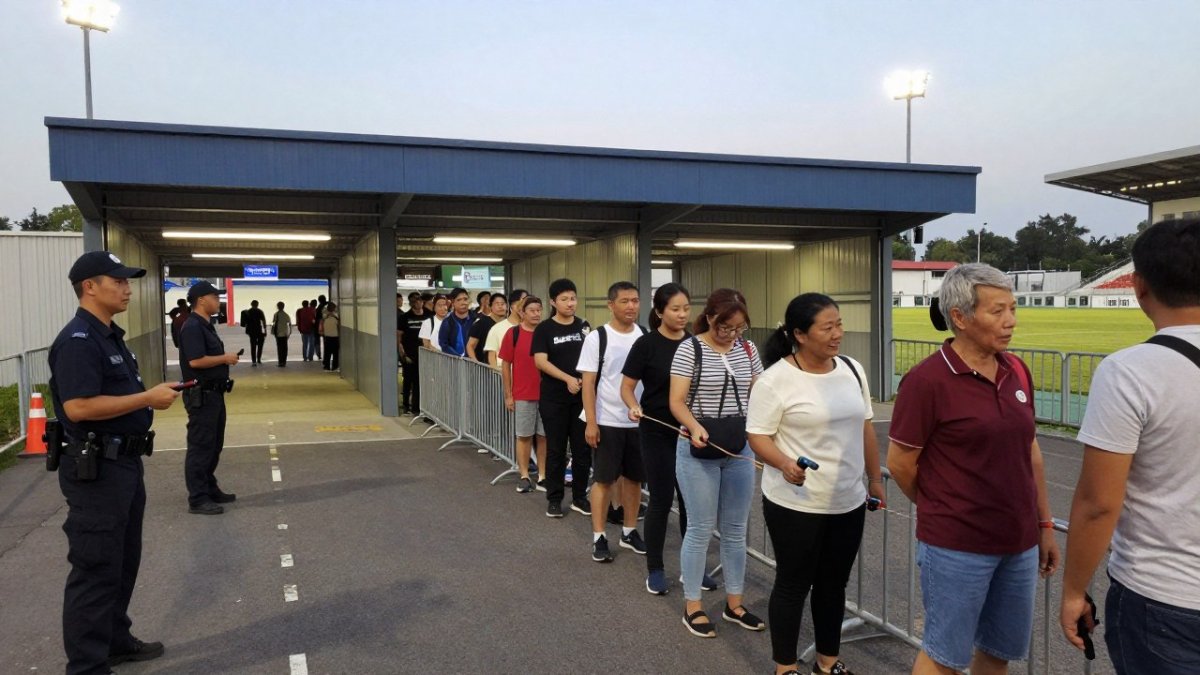
Measure the lane before you plan the gate
Run a timed observation during a live event or full-scale drill. Count attendees who complete primary screening in a fixed window, typically 10 to 15 minutes, and convert to people per hour per lane.
The same equipment often produces very different rates depending on what happens before the detector. Pre-announced rules, a single-file queue, and staff pulling obvious metal items before the lane all raise throughput without touching sensitivity settings.
Model arrival surges, not average attendance
Average arrival rate hides the problem. Ticketed entry windows, transit schedules, and headline acts create surges. Build a simple arrival curve from historical gate data or ticketing scan times, then calculate the queue that forms when arrival rate exceeds screening capacity.
Use three inputs: peak arrivals per minute, measured screening capacity per minute per lane, and the queue length you are willing to tolerate outside the perimeter. The difference between arrival rate and capacity, multiplied by surge duration, gives the backlog, your queue, and a security exposure, since a dense, unstructured crowd outside the gate is harder to manage than a formed line inside it.
Set service-level targets you can audit
Reliability is easier to defend when expressed as targets rather than intentions.
Watch out: teams often measure average wait across the whole entry window, which masks the ten minutes when the queue actually broke. Measure the peak, not the mean.
For deeper tactics on lane design and queue performance, our article on how to improve throughput at security checkpoints goes further into measured approaches.
A Practical Framework for Choosing a Screening System
Choosing a screening system comes down to five scored criteria: threat profile, throughput requirement, space and power, staffing model, and acquisition cost over the full deployment period.
- Threat profile: what are you actually screening for? Metal weapons call for metal detection; shape-defined threats may justify AI scanning.
- Throughput requirement: your measured people-per-hour target per lane, not a vendor claim.
- Space and power: can the lane be sited away from structural steel? Is power available at the entry point?
Many venues find a mix of permanent equipment for fixed entrances and rental units for temporary events gives the best balance. If you are acting on the choice, our walk-through metal detector rental options explain how short-term deployment works.
Accessibility, Privacy, and Attendee Rights at Screening Checkpoints
Screening must be accessible, minimally intrusive, and clearly explained. Attendees have a right to know what the process involves, and venues must provide an accessible route that does not compromise screening.
Practical points that come up repeatedly:
- Provide at least one lane with a wider clearance and a level approach for wheelchair users and attendees with mobility aids.
- Train staff on pat-down alternatives and on screening attendees who cannot pass through an archway.
- Keep alarm resolution discreet. Pulling someone aside in full view of a queue invites complaint.
Equipment choice feeds directly into this. Our MD-33 33-zone walk-through metal detector uses zone pinpointing to reduce unnecessary secondary screening and is designed for ADA-compliant access, which shortens the resolution step for attendees who trigger an alarm on a benign item.
Technology Integration, Failure Planning, and Total Cost of Ownership
Total cost of ownership for screening includes equipment, calibration and maintenance, staff to run it, space it occupies, and the cost of downtime. Failure planning is part of that number, not an afterthought. Screening reliability depends less on any single device than on how detection equipment, ticketing, credential systems, communications, and manual fallback procedures behave together when something goes wrong.
Map the integration points before the event
Screening touches ticketing and credential verification, the radio or communications system used by supervisors, the incident logging system, and often the venue's access control or CCTV platform.
Keep the screening record and the incident record in the same reporting system where possible. Alarm logs, resolutions, and confiscations should feed post-event review alongside crowd and access-control data, so the venue reviews one record rather than reconciling three.
Plan for the three failure modes
Most screening failures fall into three categories, and each needs a rehearsed response.
- Equipment fault. A walk-through unit stops alarming, drifts, or loses power mid-event. The fallback is a documented secondary screening procedure using hand-held detectors at the same lane, with a supervisor notified and a replacement requested. Know how quickly a replacement or spare unit can be on site, and whether rental support covers mid-event swap.
- False-alarm surge. Sensitivity set too high, structural steel interference, or a run of attendees carrying benign metal can push alarm rates up and stall the lane. Don't lower sensitivity reflexively; move alarmed attendees to secondary screening, keep the primary lane moving, and investigate the cause at the next break.
- System or network outage. Ticketing, credential, or communications outages force manual verification. Pre-print fallback lists, define who authorizes manual entry, and brief staff before doors open rather than during the outage.
Watch out: the most common failure is not a broken detector but an undocumented fallback. Staff improvise under pressure, and improvisation is where screening consistency breaks down.
Put support and downtime in the contract
Ask three questions before signing anything. What happens when a unit faults mid-event? How quickly can a replacement be on site? And what is the fallback screening procedure while you wait?
Compliance requirements, warranty terms, calibration intervals, and support response times belong in the contract, not a verbal assurance. For public buildings and government facilities, the documentation trail is often as important as the equipment itself.
Frequently Asked Questions
How much security do I need for 500 people?
For a 500-person event, plan for at least two screening lanes and four to six security staff, including screeners and crowd flow managers. Throughput varies by equipment: throughput depends on the equipment and procedures in use, so measure your own lane rates before planning. Always add a buffer for peak arrival times and have a supervisor on site. The exact number depends on the venue layout, attendee profile, and threat level, so run a tabletop exercise before finalizing staffing.
What equipment is used for event security screening?
Common event security screening equipment includes walk-through metal detectors and hand-held metal detector wands. Walk-through units suit high-volume entry points, while hand-held wands provide flexibility for secondary screening or roving patrols. The right mix depends on your throughput goals, budget, and whether you need temporary rental or permanent installation.
How can venues reduce entry lines while maintaining effective screening?
Reducing event entry lines starts with matching lane capacity to arrival curves. Add more screening lanes for peak windows and use walk-through detectors for high-volume throughput. Ticket verification should happen before the screening checkpoint to avoid bottlenecks. Staff training on hand-held metal detector procedures also speeds up secondary checks. Measure people per hour per lane during a test run and adjust staffing and lane counts accordingly.
How should event staff use hand-held metal detectors?
Staff should sweep the detector slowly and methodically around the body, front and back, at a consistent distance. Keep the wand parallel to the body and avoid touching the attendee. If an alarm sounds, ask the person to remove the item or step aside for a secondary check. Training should cover polite communication, privacy considerations, and when to escalate to a supervisor. Regular refresher sessions keep procedures consistent.
What are the five C's that security guards should possess?
The five C's often cited for security guards are character, communication, competence, commitment, and courage. For event screening, communication and competence matter most: staff must explain procedures clearly, handle nervous attendees calmly, and operate equipment correctly. Character ensures fairness and integrity at checkpoints. Commitment keeps guards alert during long shifts. Courage helps them respond appropriately to incidents. Include these qualities in hiring and training criteria for event security staffing.
What are security screenings?
Security screenings are checkpoint procedures that inspect people, bags, and credentials before they enter a venue or facility. They aim to detect prohibited items such as weapons and to verify that attendees have valid access. Common methods include walk-through metal detectors, hand-held wands, bag checks, and ticket verification. Reliable security screening for large venues combines these methods with trained staff and clear procedures to balance safety with attendee experience.