 How-to
How to Improve Throughput at Security Checkpoints
Last Updated: October 30, 2026
Quick Summary
To improve throughput at a security checkpoint, treat it as a production line: measure passengers per hour per lane, fix the single biggest bottleneck first, and separate queuing, divestment, screening and reclaim zones so they never collide. Staff lanes to match peak arrival waves and shorten the steps before and after screening, never the screening decision itself.
- Define your throughput goal in people per hour, not as a vague "faster" target.
- Track five KPIs per lane per day, including throughput, wait time and preparation rate.
- Placing divestment tables too close to the detector can halve lane capacity.
- Assign one officer to queue management during peaks to keep passengers moving and prepared.
- Keep a reserve of portable hand-held detectors ready to deploy during sudden surges.
Table of Contents
- Why Checkpoint Throughput Matters and How to Start
- Security Screening Throughput Measurement: Build Your Baseline
- Security Checkpoint Layout Best Practices for Higher Capacity
- Security Screening Staffing Optimization: Matching Officers to Demand
- Screening Technology and Automation That Raise Passenger Throughput
- Security Checkpoint Wait Time Reduction Through Queue Management
- Balancing Faster Screening With Security Effectiveness
- Contingency Planning for Surges and Equipment Outages
- Frequently Asked Questions
Why Checkpoint Throughput Matters and How to Start
Improving throughput at security checkpoints starts with treating the checkpoint as a production line, not a guard post.
The core problem is rarely the detector itself.
Start with three decisions before you buy anything:
- Define the goal in people per hour, not "faster." A vague target cannot be measured or managed.
- Map the current flow end to end. Walk the queue as a passenger would, from the entrance to the cleared side.
- Identify the single biggest bottleneck. Fix that one thing first; spreading effort across five fixes usually changes nothing.
A common mistake is buying new equipment to solve a layout problem. A faster detector in a badly arranged lane still produces a slow checkpoint.
If budget is the constraint, leasing and rental arrangements can let you upgrade screening equipment without a large capital outlay.
Security Screening Throughput Measurement: Build Your Baseline
You cannot improve security screening throughput measurement without a baseline you trust. Most sites guess at their numbers. A baseline turns guesswork into a target you can hit and defend.
Metrics That Actually Predict Congestion
Track a small set of numbers consistently rather than a large set badly:
- Passengers per hour per lane, the single most useful figure.
- Peak arrival rate, how many people hit the entrance in your busiest 15 minutes.
- Average wait time, measured, not estimated.
How to Collect Wait-Time Data Without Adding Staff
Manual recording with a clipboard and a stopwatch is enough to start. Have an officer note arrival and clear times for a sample of passengers during peak demand. Do this for a week and you will see the pattern.
Sensors and video analysis can automate this later, but they are not required to begin. The point is to get honest numbers now, not perfect numbers eventually.
Security Checkpoint Layout Best Practices for Higher Capacity
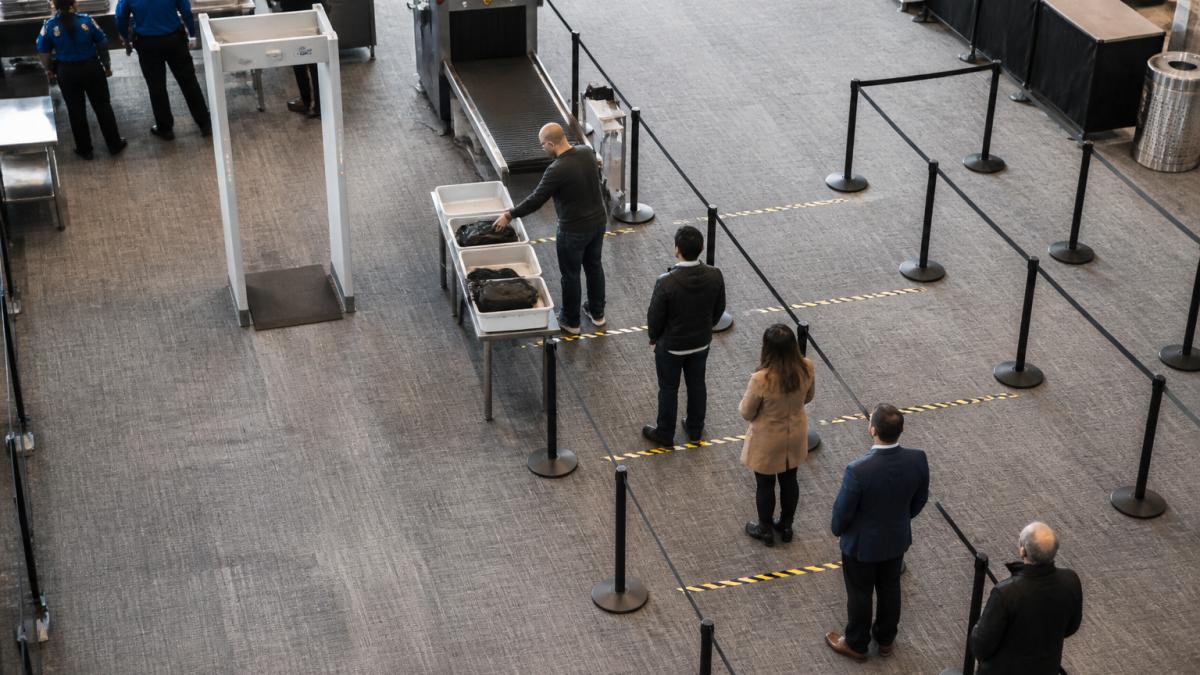
Layout is where most checkpoints lose capacity they already own. Security checkpoint layout best practices come down to separating four jobs so they never collide: queuing, divestment, screening, and reclamation of belongings.
Lane Configuration and Divestment Zones
A screening lane works best when each zone has one purpose:
- Approach zone, space to form a queue without blocking the entrance.
- Divestment zone, tables and trays placed before the detector, not beside it.
- Screening zone, the detector itself, kept clear of clutter.
Watch out: placing divestment tables too close to the detector forces passengers to stop mid-lane, and that single mistake can halve your lane capacity.
Security Screening Staffing Optimization: Matching Officers to Demand
Security screening staffing optimization means putting the right number of officers on the floor at the right times, not simply hiring more. Demand is rarely flat. Arrivals spike in waves, and a staffing plan that ignores those waves wastes labor in slow hours and fails in busy ones.
Build a simple staffing model around your peak demand data:
- Match open lanes to arrival rate, not to a fixed daily schedule.
- Cross-train officers so they can rotate between divestment help, screening, and alarm resolution.
- Assign one officer to queue management during peaks to keep passengers moving and prepared.
The thing nobody tells you about staffing is that a well-placed officer managing passenger flow often speeds up a checkpoint more than an extra screening lane.
Screening Technology and Automation That Raise Passenger Throughput
Technology raises passenger throughput only when it removes a step or shortens a decision. Automatic detection and checkpoint automation help most when they reduce false alarms and speed alarm resolution, because those are the moments that stall a lane.
Walk-through detectors with multi-zone pinpointing can help officers identify where an alarm triggered.
If you are evaluating a technology upgrade, you can review the walk-through and hand-held metal detectors offered by Metal Defender, and ask about optional accessories. You can also explore a high sensitivity luggage scanning X-ray machine for faster bag screening at checkpoints.
The rule we would give any operations team: buy technology that shortens the alarm-resolution step, not just the walk-through step.
Security Checkpoint Wait Time Reduction Through Queue Management
Security checkpoint wait time reduction is mostly a queue management problem, and queue management is mostly about information, preparation, and timing. Most guides stop at "add signage and open more lanes." The gap is that they rarely show how to sequence those moves or how to prove they worked. This section gives you both: a measurable KPI framework and a step-by-step pilot-and-scale plan you can run without new capital equipment.
Contact Us For Your Ordering & Rental Needs →
A Consistent KPI Framework for Queue Management
Before changing anything, agree on five numbers and track them the same way every day. This is the framework most checkpoint teams lack, and it is what lets you compare interventions fairly.
- Throughput: passengers cleared per hour per open lane. This is your capacity number.
- Wait time: minutes from joining the queue to stepping through the detector. Measure a sample, not a guess.
- Queue length: passengers waiting at the entrance at a fixed interval (for example, every 10 minutes during peak).
Track these on one sheet per lane per day. A common pattern is that wait time spikes trace back to low preparation rate or low lane utilization, not to the detector itself.
A Step-by-Step Implementation Plan
Run queue changes as a short pilot rather than a site-wide overhaul. A practical sequence:
- Baseline for one week. Record the five KPIs during your busiest two hours each day. Do not change anything yet.
- Pick one intervention. Choose the single change most likely to move your worst KPI. If preparation rate is low, start with pre-divestment and signage. If utilization is low, start with lane scheduling.
- Pilot for one week on one lane. Keep the other lanes unchanged so you have a control. Compare the pilot lane against the control lane on the same KPIs.
- Decide with data. If the pilot lane improves throughput or wait time without raising alarm-resolution time, keep it. If not, stop and try the next intervention.
- Scale only what worked. Roll the change to all lanes, then re-baseline. Repeat the cycle for the next bottleneck.
This sequence matters because it prevents the most common failure: changing five things at once, seeing a small improvement, and never knowing which change caused it.
Low-Cost Queue Moves That Compound
Once the framework is in place, these moves are the ones that reliably move the numbers:
- Signage before the queue telling passengers what to remove and place in trays. Put it where people can read it while waiting, not at the divestment table.
- Pre-divestment at the back of the queue during peaks, so passengers arrive at the table ready.
- Separate lanes for passengers with strollers, bags, or accessibility needs so they do not slow the main flow. This is also an accessibility measure, not just a speed measure.
Small changes here compound. A prepared passenger spends seconds at divestment instead of a minute, and that difference multiplies across every passenger in the peak hour.
Balancing Faster Screening With Security Effectiveness
Speed and security are not opposites, but they do pull against each other if you let them. The goal is to remove wasted time without removing scrutiny. A checkpoint that waves people through faster by skipping alarm resolution is not faster; it is unsafe. True operational fluidity requires a design that accommodates every traveler with the same precision found in modern facility access control.
Protect the Steps That Matter
Keep security effectiveness intact by protecting the steps that carry the risk:
- Never cut alarm resolution to clear a queue. Resolution time is where security lives.
- Keep sensitivity programmed to your site's risk level, not lowered to reduce alarms.
- Maintain equipment on schedule so detection stays reliable.
A useful rule: shorten the steps before and after screening (arrival, divestment, reclaim), but never shorten the screening decision itself.
Accessibility and Accommodations as a Throughput Lever
Accessibility is usually treated as a compliance topic, not an operations topic. In practice, it is both. Passengers with disabilities, families with strollers, people with language needs, and passengers who need extra time can slow a main lane disproportionately if their needs are handled at the detector rather than before it.
Practical accommodations that keep flow moving:
- A designated assisted lane or assisted area where passengers who need more time can be screened without holding up the main queue.
- Clear, plain-language signage with visual icons, so passengers who cannot read the local language still know what to remove.
- Staff trained to offer assistance proactively, rather than waiting for a passenger to ask at the detector.
A common pattern is that sites which formalize these accommodations see fewer mid-lane stoppages, because the passengers most likely to need extra time are routed to a place designed for them instead of arriving unprepared at the main lane.
The Trade-Off to Manage
Every accommodation adds a step somewhere. The balance is to move that step earlier in the flow, not to remove it. Assisted screening still gets full scrutiny; it just happens in a lane or area built for it. That keeps security intact, keeps the main queue moving, and treats passengers with dignity.
Contingency Planning for Surges and Equipment Outages
Contingency planning is the part most checkpoints skip, and it is the part that saves you when demand spikes or a detector fails. A surge plan and an outage plan are different, and you need both.
For surges:
- Keep a reserve of portable hand-held detectors ready to deploy.
- Identify a second divestment point you can open quickly.
- Pre-plan which lanes open first when volume climbs.
For outages:
- Keep at least one backup detector on site or on call.
- Know your escalation path for repairs before something breaks.
- Have a documented fallback screening procedure that keeps security intact.
When you need capacity fast without a purchase, walk-through metal detector rentals let you add screening lanes for a surge or cover an outage while equipment is serviced.
| Scenario | First Move | Backup | What to Watch |
|---|---|---|---|
| Sudden passenger surge | Open reserve lane | Deploy hand-held units | Queue spillover at entrance |
| Detector failure | Switch to backup unit | Call for service | Alarm resolution delays |
| Staff shortage | Cross-trained rotation | Queue manager reassigned | Lane closures in peak |
| Bag line backup | Add bag screening point | Redirect to second lane | Reclaim zone congestion |
Frequently Asked Questions
How do you measure throughput at a security checkpoint?
Count passengers processed per hour at each screening lane and pair it with average wait time from queue entry to cleared screening. Manual tally counters give a starting baseline, while sensors and video analysis automate the count across peak periods. Track lanes open, lane utilization, and queue length alongside those two numbers so you can see whether a slowdown comes from staffing, layout, or equipment. Review the data weekly and compare peak versus off-peak demand patterns before making changes.
How can staffing improve security checkpoint throughput?
Staffing optimization starts with matching officer deployment to demand patterns rather than covering fixed shifts. Stagger breaks away from peak arrival windows, cross-train officers so divestment, screening, and resolution roles can flex, and pre-position relief staff before queues build. Measure performance metrics after each scheduling change to confirm the gain holds.
How do you balance faster screening with effective threat detection?
Speed and security only conflict when process design forces the trade. Set detection thresholds on your screening equipment so routine items like keys and belt buckles stop triggering alarms, which cuts false alarms without lowering risk mitigation. Keep secondary screening staffed and close to the lane so flagged passengers clear fast. Review alarm rates and resolution outcomes monthly; if alarm rates climb while detection stays flat, the equipment settings or passenger preparation guidance need adjustment, not a slower process.
What technology can help speed up security screening?
Walk-through metal detectors with adjustable sensitivity and automatic detection reduce manual wanding, and hand-held detectors handle secondary checks without pulling passengers out of the lane. Sensors and video analysis automate wait-time measurement so you spot bottlenecks in real time. The bigger gains usually come from deployment flexibility: portable and rental units let venues add lane capacity for peak demand without a capital purchase. Confirm any equipment meets the compliance requirements for your facility type before committing.
Faster checkpoints come from measuring honestly, fixing the biggest bottleneck first, and keeping security steps intact while you do it. Metal Defender builds walk-through and hand-held metal detection equipment for venues, schools, warehouses, and government facilities, with flexible buying, leasing, and rental options and optional accessories to fit your site. Contact us for your ordering and rental needs and get a screening plan built around your actual passenger flow.