 blog
blog
Handheld Metal Detector for Event Staff: 2026 Guide
Table of Contents
- Handheld Metal Detector for Event Staff: What Actually Matters on the Gate
- Handheld Metal Detector for Security: Core Features Buyers Compare
- Metal Detector Wand Screening Procedures for High-Volume Entrances
- Handheld Metal Detector Sensitivity Settings and Alarm Interpretation
- Event-Specific Selection Criteria: Matching the Detector to the Crowd
- Battery, Durability, and Maintenance for Event Security Teams
- Rental vs. Purchase: Flexible Acquisition for Temporary Screening
- Conclusion: Building a Screening Setup That Holds Up on Event Day
- Frequently Asked Questions
Last Updated: October 19, 2026
Handheld Metal Detector for Event Staff: What Actually Matters on the Gate
A handheld metal detector event staff rely on is a screening tool, not a magic wand. It finds metal, not intent, and it will not fix a badly run entrance.
Below, we break down the features buyers compare, the procedures that keep queues moving, and the maintenance routine that stops a detector dying at 7pm on a Saturday.
Handheld Metal Detector for Security: Core Features Buyers Compare
Three features decide whether a handheld metal detector for security works on your gate: how it detects, how it alerts, and how long it lasts on a charge. Everything else is detail.
Detection Sensitivity and Alarm Modes
Sensitivity is the depth at which the wand picks up a target, and higher is not automatically better. A unit set too hot reacts to zips, rivets, and phone cases, and staff stop trusting the alarm.
Alarm modes matter just as much. Look for three options: audible alert for noisy outdoor gates, a visual LED indicator for crowded or sensitive environments, and vibration for discreet screening. Staff should be able to switch modes in seconds without reading a manual.
Battery Life, Weight, and Build Quality
A wand gets held for hours, so weight and balance decide whether your team still sweeps properly at hour six. Rechargeable units with swappable batteries suit long events; standard cells suit teams who cannot manage charging rotas.
Build quality shows up in the joints and the coil housing. A detector that flexes at the handle will drift out of calibration. Ask how the unit survives being dropped on concrete, because it will be.
Metal Detector Wand Screening Procedures for High-Volume Entrances
Speed comes from procedure, not the detector. A clear, repeatable sweep pattern lets trained staff process a steady queue without cutting corners, and gives you something to audit when throughput drops.
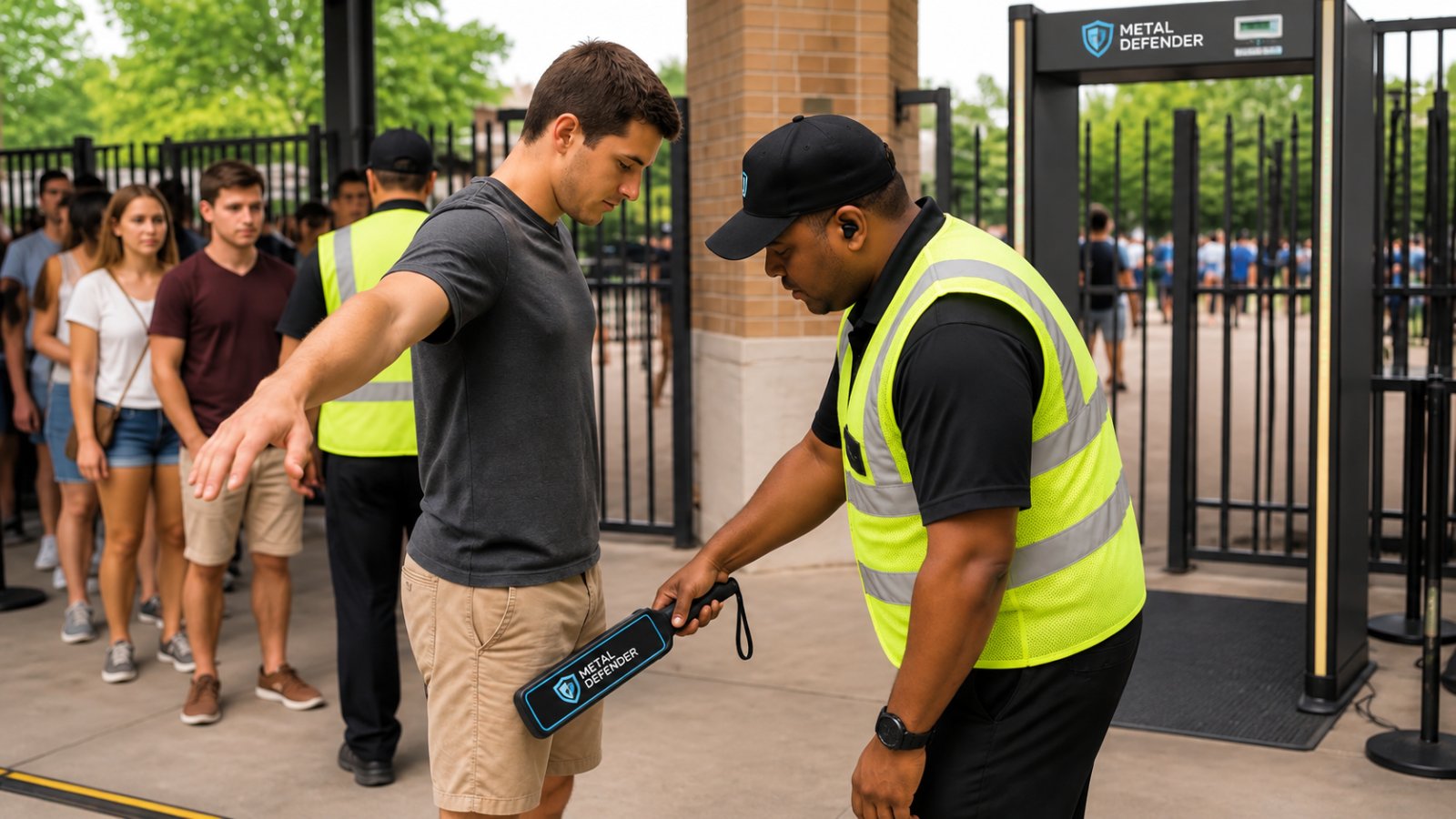
Security guard using a handheld metal detector event staff to screen a visitor at a busy venue entrance gate
Staff Positioning and the Sweep Pattern
Position the visitor side-on to the screener, arms slightly away from the body, feet apart. The steward sweeps the wand close to the body in overlapping passes: down the front, across the torso, down each leg, then the back and sides. A slow, even sweep detects more than a fast, jerky one.
Set the lane so the visitor steps onto a marked spot. That single piece of floor tape does more for consistency than any training slide.
Responding to an Alert Without Causing a Scene
An alert is a prompt to look closer, not a conclusion. Staff should ask the visitor to remove the item, or step to a secondary screening position away from the main queue, and repeat the sweep. Keep your voice level, explain what you are doing, and never block a visitor's exit route.
The secondary position is the piece most venues forget. Without it, every alarm stops the whole lane.
Handheld Metal Detector Sensitivity Settings and Alarm Interpretation
Most false alarms trace to one of three things: sensitivity set too high, a sweep too close to the body, or a metal item the visitor forgot. Work through them in that order, and give staff a written protocol so every alert is handled the same way.
Setting Sensitivity for Your Threat Model
Sensitivity is the detector's response threshold to metal mass at a given distance. Lower sensitivity means only larger or closer metal objects trigger the alarm.
Start with the level your supplier recommends for general screening, then adjust for your crowd.
Use a known test item to calibrate at the start of each event. A coin or set of keys works for a quick check, but a dedicated test piece matching your threat profile is better.
Reading the Alarm: What Different Responses Mean
Interpretation improves with a simple framework. A short, sharp response at close range is usually a small item near the surface: a phone, keys, a belt buckle, or coins. A broad response further out suggests something larger or denser.
Teach staff to note three things on every alert: where on the body the response occurred, how wide it was, and whether it repeated on a second sweep.
A Repeatable Alarm-Response Protocol
An alert is a prompt to look closer, not a conclusion. A workable protocol looks like this:
- Pause the sweep and ask the visitor to remove the item if it is visible and safe to do so.
- If the item is not obvious, step the visitor to a secondary screening position away from the main queue.
- Repeat the sweep at the secondary position, adjusting sensitivity only if your procedure allows it.
- If the alert persists, follow your venue's escalation policy; do not improvise a search beyond your training.
- Log the alert type and outcome so patterns emerge across events.
The secondary position is the piece most venues forget. Without it, every alarm stops the whole lane.
Contact Us For Your Ordering & Rental Needs →
Balancing Detection Performance and False Alarms
No setting eliminates false alarms without also reducing detection. The practical balance is to set sensitivity to your threat model, train staff to interpret responses, and review logs after each event. If a lane reports a high false-alarm rate, check sweep technique first, then sensitivity, then the detector itself.
Event-Specific Selection Criteria: Matching the Detector to the Crowd
There is no universal best wand. Picking one that suits your venue, throughput, and staff means answering four questions honestly: how many people per hour must pass, what threat you screen for, what environment the lane sits in, and how much training your staff have.
Start With Throughput, Not Product Listings
Throughput decides most hardware choices. A single lane with a trained screener and a clear procedure can process a steady queue when the detector alerts quickly and the response protocol is simple.
Estimate your peak flow before you shop. Count the busiest 15 minutes of a comparable event, multiply to an hourly rate, and divide by the number of lanes you can staff.
Matching the Detector to Venue and Crowd Volume
Venue Type | Typical Crowd Pattern | Throughput Priority | Sensitivity Approach | Key Detector Trait |
|---|---|---|---|---|
Stadium or arena | Large surges at gates | Very high | Lower, weapon-focused | Fast alert, spare batteries, lightweight |
Festival or outdoor event | Variable, weather-exposed | High | Moderate, adjustable | Weather resistance, durable coil housing |
School campus | Repeated daily flows | High, repeated daily | Higher, thorough | Durable build, discreet alert |
Courthouse or government | Lower, high assurance | Lower, high assurance | High | Adjustable sensitivity, visual alert |
Warehouse checkpoint | Low, internal | Low, internal | Tuned to specific items | Compact, portable, easy redeploy |
Private client sites | Variable | Variable | Operator-adjustable | Lightweight, quick setup |
Work down that table before you look at any product listing. A venue with a fast public gate and a slow staff entrance needs two different sensitivity settings, even with the same wand.
Screening Environment and Staff Skill
Environment matters as much as crowd size. Outdoor gates deal with rain, dust, and temperature swings, so coil housing and joints must survive being dropped and stored in a van. Indoor checkpoints can use audible alerts; crowded or sensitive environments may need visual or vibration modes.
Staff skill is the variable handheld metal detector event staff buyers underestimate. Too many modes and menus slow down a steward on a busy gate.
Accessibility and Respectful Screening
Selection is not only about hardware. Plan how staff will communicate with attendees, accommodate medical devices, and handle visitors who cannot remove items easily. A detector with adjustable sensitivity and a clear visual alert lets staff step a visitor aside without announcing the reason to the whole queue. Write the accommodation procedure into your event plan and brief staff before gates open.
Battery, Durability, and Maintenance for Event Security Teams
A screening lane goes down for three reasons: a flat battery, a damaged coil, or a detector that has drifted out of adjustment. All three are preventable with a routine that takes minutes.
- Charge or swap batteries at the end of every shift, not when the indicator warns you
- Wipe the coil and housing after outdoor events to remove grit and moisture
- Store wands in a case, not loose in a van where the coil takes knocks
- Check sensitivity against a known test item at the start of each event
- Log faults so recurring issues reach your supplier rather than your staff
Keep a spare wand per four lanes. That ratio keeps a lane running when one unit needs attention, and it costs far less than an hour of backed-up queue.
Rental vs. Purchase: Flexible Acquisition for Temporary Screening
Buying suits permanent checkpoints. Renting suits events, pilots, and budget cycles that will not stretch to capital spend this year.
Rental also lets you test a model before committing. Run a rented wand through a full event, watch how staff handle it, then decide.
Metal Defender supplies both walk-through and hand-held detection units through direct sale, leasing, and rental, with optional accessories and support to match.
Conclusion: Building a Screening Setup That Holds Up on Event Day
The hard part is not choosing a detector. It is building a lane that still works when the queue surges, a battery dies, and a visitor sets off an alarm with a belt buckle.
Metal Defender supplies hand-held and walk-through detection equipment with flexible rental and leasing options, optional accessories, and support that keeps your screening running. Contact Us For Your Ordering & Rental Needs and build a gate that holds up on the day.
Frequently Asked Questions
How should event staff use a handheld metal detector?
Staff should hold the wand level and sweep it slowly across each side of the visitor's body, front and back, keeping a consistent distance from clothing. Ask visitors to remove phones, keys, and belts before the sweep to reduce false alarms. Keep the pace steady rather than rushed, and have a second staff member nearby to handle any alerts privately. Regular training on the sweep pattern and alarm response matters more than the detector model itself, especially at high-volume entrances where bottlenecks build quickly.
What sensitivity setting should I use for crowd screening?
Start at a moderate sensitivity that catches a small knife or a concealed phone-sized metal object without reacting to zippers, rivets, or jewelry. Test the setting with a known test object before doors open, then adjust based on the crowd. Higher sensitivity catches smaller contraband but triggers more false alarms, which slows the line. For events with heavy metal clothing or accessories, a slightly lower setting with a clear secondary inspection step usually keeps throughput up without weakening screening.
Are handheld metal detector wands safe for visitors with medical devices?
Handheld detectors emit a low-level electromagnetic field, and most venues still ask visitors with pacemakers or implanted devices to step forward and declare the device before screening. Staff should never sweep a wand directly over a declared implant. Instead, use a visual check and a pat-down procedure handled by trained personnel. Post clear signage at the entrance so visitors know what to expect, and brief staff on the protocol before every event to avoid awkward or unsafe handling at the gate.
Do event venues need both walk-through and handheld metal detectors?
Most large venues use both. A walk-through detector handles the bulk of the queue at a steady pace, while handheld wands resolve alerts, screen staff and vendors, and cover secondary entrances or VIP lanes. Handheld units also suit temporary sites where installing a fixed frame is impractical. If budget is tight, many operators start with handheld detectors and add walk-through units as volume grows, or use rental options to cover peak event dates without a full capital purchase.